How it works
Two-click setup. One connection does the rest.
Backstop sits between Stripe and your customers. The Stripe connect is two clicks and the whole setup runs about ten minutes. We listen for failed payments, schedule retries, ship dunning, host the card-update page and customer portal, and run your cancel flow — without ever seeing your Stripe secret key or your customers' card details.
~10 min setup · no sales call · 14-day Pro trial
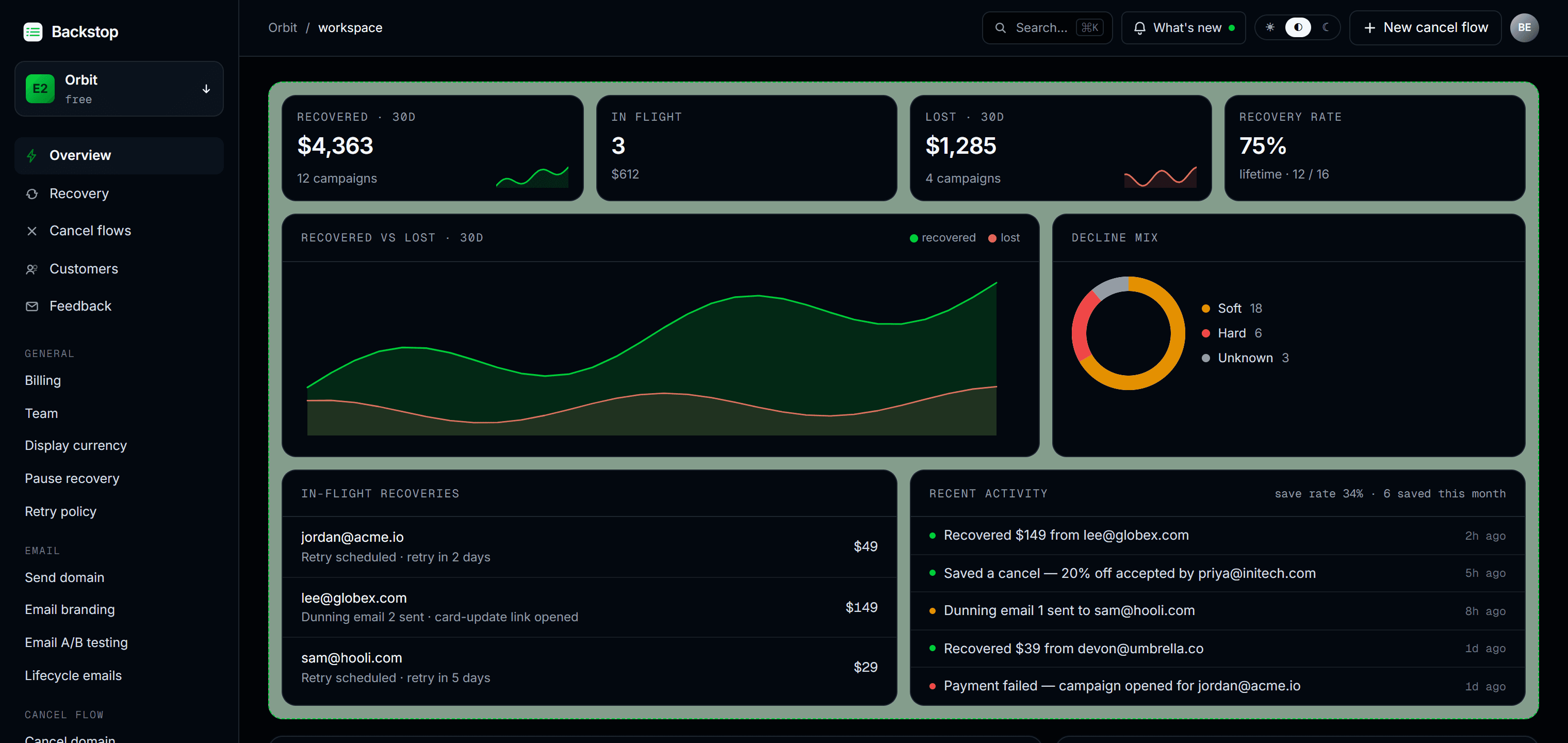
Connect Stripe once. Everything below runs automatically.
One Stripe Connect grant wires up everything below. No webhooks to host and nothing to build. Recovery, retention, and win-back all run off the same connection.
Failed payments
Decline-code rules you can read, not a black-box model. Soft declines get the +3 / +5 / +7 retry cadence; hard codes get one polite retry, then dunning.
Smart retries, decline-aware
Capped at 6 attempts in 30 days, inside Visa safe-harbor.
4-touch dunning · days 0 / 3 / 7 / 14
Sent from your own verified domain (SES / Resend).
Hosted card-update on every link
Auto-closes the moment invoice.paid lands mid-flight.
Per-decline-code insights + mix forecast
A past-due dashboard with one-click actions on every open campaign.
Cancels
Your “Manage subscription” button opens a hosted save flow. Branch on the survey reason, then make a real offer, with no webhook wiring. The cancel exit stays one tap away.
Survey → Save Stories → Offer → Confirm
A short proof step before the ask. Branch by reason.
Discount, pause, gift months, or plan-switch
Stripe coupons + pause_collection, applied for you.
Cancel-as-easy-as-signup by default
A one-tap “Cancel anyway” on every step. No dark patterns.
The ones who left
A couple of weeks after someone leaves, Backstop emails them a link that drops them back onto their old plan. Their card is still on file, so there is nothing to re-enter. The ones who come back show up in your numbers.
Back on their old plan in one tap
A signed link in the email re-subscribes them. No signup flow, no card re-entry.
The email knows why they left
Too pricey, a missing feature, off to a competitor: the copy adapts, and a second touch follows.
Reactivations land in your dashboard
Who came back, when, and what it was worth, attributed automatically.
The retention loop needs one snippet on your side. Pick whichever fits your stack; recovery and win-back run server-side with nothing to install.
embed.js modal
One line of JS. The save flow opens on your own domain.
Hosted redirect
No SDK. Point a link at the hosted portal and you are done.
AI-agent prompt
Paste our prompt into Claude Code or Cursor and it wires the snippet.
A scoped, read_write Connect grant — so the loops can actually act.
Recovery and retention have to retry invoices, apply coupons, pause, and switch plans — that needs write access, not read-only. We never see your secret key, the grant is encrypted at rest and never used to move money to us, and you can revoke it from Stripe's connected-apps page in one click.
Under the hood
Six layers, from the OAuth click to the dashboard.
The same Stripe connection drives every step. Here is each one in order — the real mechanics, with the implementation line underneath.
- 01
Connect Stripe in two clicks
Stripe Connect OAuth — you authorize us through Stripe's consent screen, and we never see your secret key. We request read_write because recovery has to act on your account: retry failed invoices, attach save-offer coupons, and pause, cancel or switch plans. The token is encrypted at rest and revocable from your Stripe dashboard in one click. Connect a Stripe test account first to kick the tires — zero risk, no card.
oauth.scope = read_write · key.access = none
- 02
We listen for invoice.payment_failed
A recovery campaign opens for each failed invoice. We capture the decline reason, classify it as soft (retry) or hard (card update only), and start the recovery clock — all off webhooks, so there is nothing for you to host.
webhooks · invoice.payment_failed → recovery_campaigns.insert
- 03
Smart retries, four-touch dunning
Smart = decline-code rules, not ML. Soft declines retry on a +3 / +5 / +7 day cadence; hard declines get one polite retry, then card-update only. In parallel, four dunning emails ship at d0, d3, d7, d14 — each with a one-tap card-update link, sent from your own verified domain (Amazon SES / Resend) with one-click List-Unsubscribe, so they land in the inbox carrying your brand, not ours. Retries are capped at 6 attempts in 30 days, inside Visa safe-harbor.
retry · +3d / +5d / +7d · send · d0 / d3 / d7 / d14
- 04
Hosted card-update page (PCI SAQ-A)
Customers click the email link, land on a tokenized hosted page, and swap their card via Stripe Elements. We never see PAN or CVV — that's PCI SAQ-A, the lightest tier, because card data only ever touches Stripe's iframe. Stripe retries the failed invoice automatically. The same hosted surface powers a full customer portal that replaces Stripe's billing portal — your customers pause, switch plans, update their card, or cancel (routed straight into your save flow), all white-labeled.
token · 21d TTL · single-use · setup_intent.confirm
- 05
Cancel flow saves the rest
First, add Backstop to your app. Three ways: drop in our one-line embed.js for a modal that opens on your own domain, use a no-SDK hosted redirect link, or paste our AI-agent prompt into Claude Code / Cursor and let it wire the snippet. Then, when a customer hits “Cancel subscription,” your backend mints a one-time HMAC-signed token and routes them through your published flow: survey → a targeted save offer (discount, a pause, free months, a plan switch, or a call) → confirm. The cancel button is always visible — Easy-cancel compliant (ROSCA + state auto-renewal laws). See the install snippet →
POST /api/embed/cancel · HMAC-signed · 24h token
- 06
You see everything in one dashboard
Recovered $ vs lost $ over 30 days, a decline-mix donut, a recent-activity feed, per-customer drilldown, and cancel-flow analytics — including a per-arm save-rate readout when you A/B test save offers. Win back the ones who still leave with a one-click reactivation link in the post-cancel email. Slack / Discord pings on every save.
dashboard · KPIs · activity · drilldown
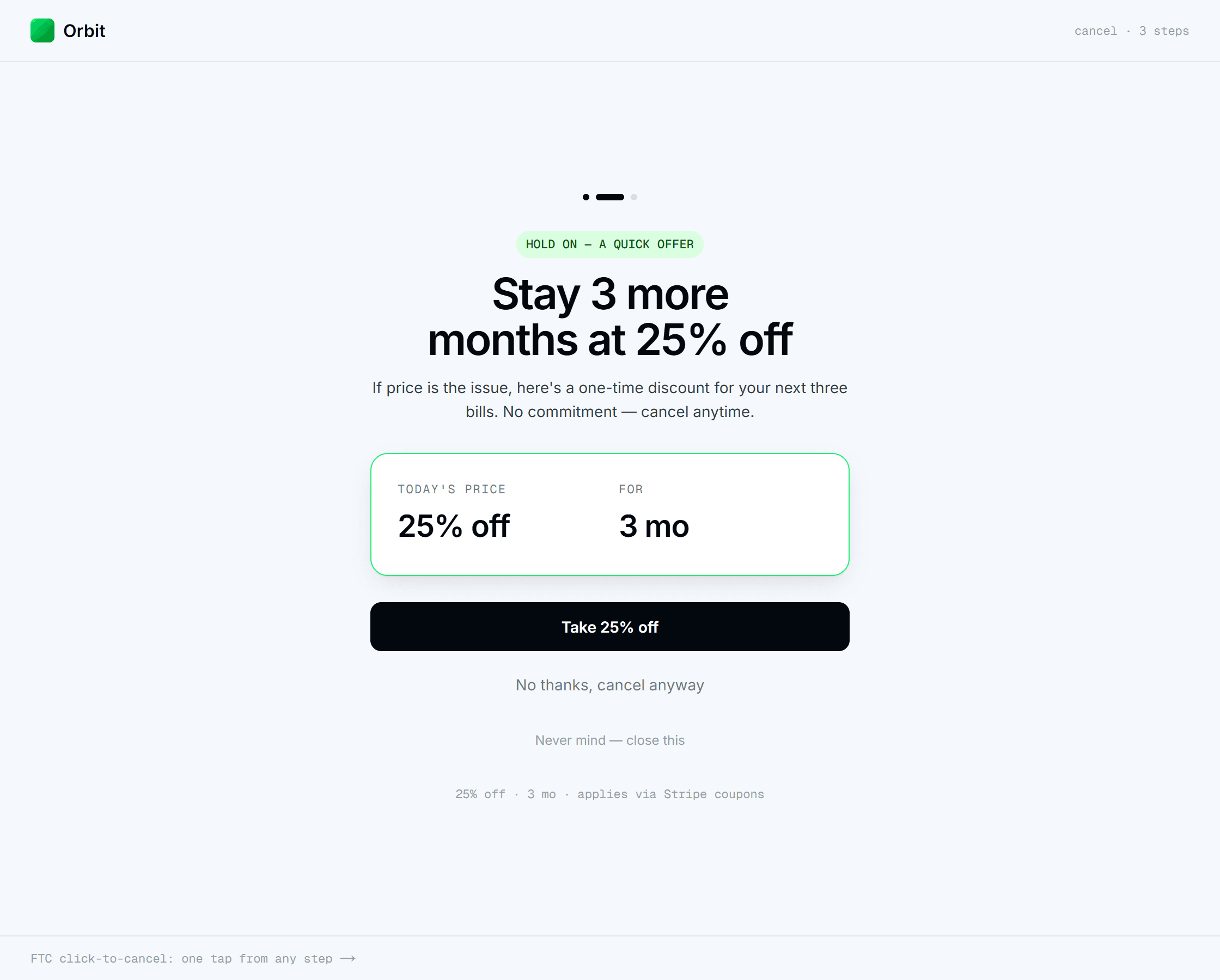
What your customer sees
A save offer on your brand, the moment they go to cancel.
The hosted flow wears theirbrand, not ours: a short survey, an optional proof step, then a targeted offer — a Stripe coupon or a paused subscription, applied for you. Accept it and they're savedon the spot. And because it's easy-cancel (ROSCA, state auto-renewal laws, and the EU cancel button), a one-tap exit is on every step.
- Steps
- survey → offer → confirm
- Branding
- your logo + domain
- Exit
- one-tap cancel
What we never touch
The keys to the kingdom stay with Stripe.
Stripe secret keys
Connect OAuth → revoke from Stripe in one click.
Card numbers, CVV, full PAN
Stripe Elements iframes only. PCI SAQ-A.
Customer login credentials
Hosted pages auth via single-use tokens.
Backstop is built by Zrionix Technology.
Stop leaking revenue you already earned.
Connect Stripe, pick a template, and your recovery loop and save flow are live. Flat $79/mo, no revenue share, ever.
~10 min setup · no sales call · 14-day Pro trial